Join to Create

All features. No paywalls. No premium buttons.
Join, create your VC, leave when done. Simple. Free. Forever.

No Setup Required
100% Safe
Easy to Use

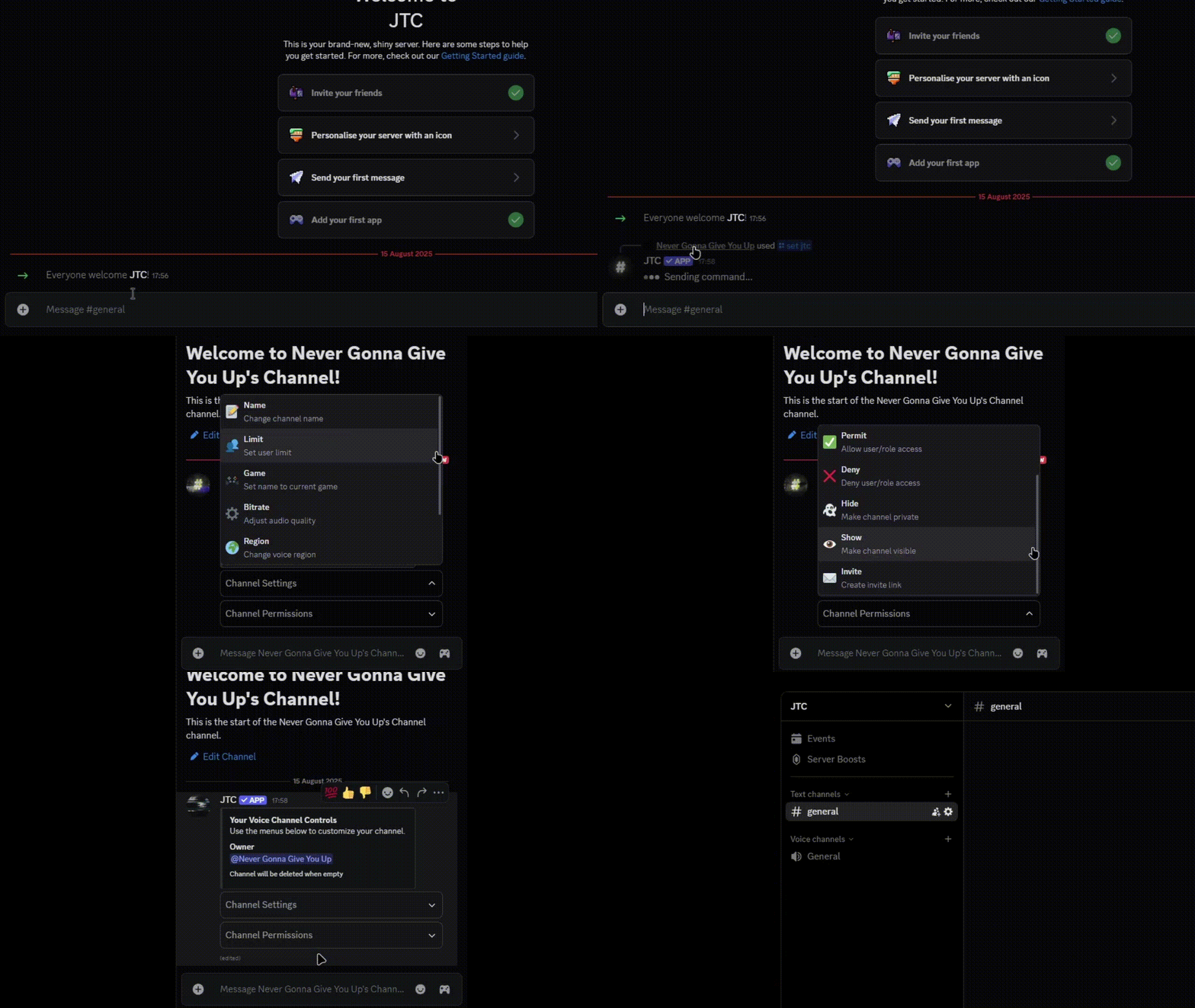
See JTC in Action

JTC Demo

Simple Commands

/set jtc

Set the Join-to-Create voice channel.

/blacklist

Manage blacklisted users and roles.

Why Choose JTC?

Instant Setup

No complex configuration. Add the bot, run one command, and it works immediately. Create voice channels on demand with zero setup time.

100% Free

Every feature included. No premium tiers, no locked functionality, no hidden costs. Everything you need, completely free forever.

Auto-Cleanup

Channels disappear when empty. No clutter, no manual deletion needed. Your server stays clean, automatically maintained.

Smart Permissions

Channel creators get full control over their voice channels. Manage who can join, speak, and moderate automatically.

Customizable

Set custom channel names, user limits, categories, and permissions. Make it work exactly how your community needs it.

Reliable & Secure

99.9% uptime. Your server data is safe and the bot is always available when you need it.

What Our Users Say

E

Exptel

Server Owner

Super easy to use and works flawlessly every time!
V

vrederik

Server Admin

Great bot, just wish there were more customization options.
A

Arc

Server Admin

Works fine, but missing a few features I wanted.

Trusted by Discord Communities

⚠️ Data will be shown at a later date as the bot has just launched.

Frequently Asked Questions

How do I set up JTC on my server?
Simply invite JTC to your server and run the `/set jtc` command. The bot will set that VC as the JTC channel and create temporary channels within its parent category. That's it — no complex configuration required!
Is JTC really completely free?
Yes! JTC is 100% free with no premium features, paywalls, or hidden costs. All features are available to everyone, forever.
What happens if someone leaves their voice channel?
When a voice channel becomes empty, JTC automatically deletes it after a few seconds. This keeps your server clean without any manual intervention.
Can I customize the channel names and settings?
Absolutely! Use the embed menu sent in the VC's message channel to customize channel names, user limits, categories, and permissions to match your server's needs perfectly.
What permissions does JTC need?
JTC needs permissions to manage voice channels, view channels, and connect to voice channels. These are the minimum permissions required for the bot to function properly. Additionally, the Administrator permission is required so the bot can manage the parent category and perform all necessary actions without restrictions.
How reliable is the bot? What's the uptime?
JTC maintains 99.9% uptime with reliable hosting. We monitor the bot 24/7 to ensure it stays online and runs smoothly.